How to Fix React Native .so Alignment Errors for Android’s 16KB Page Size
Learn how to fix React Native .so alignment errors for Android, update Gradle, and make your app 16KB page size compliant for Google Play.
Recently google play has started sending these warnings:
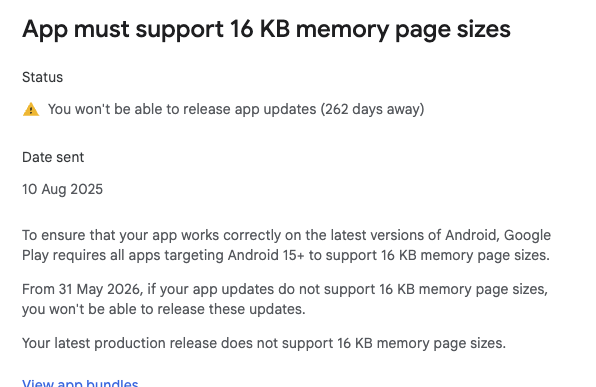
Google Play has introduced a 16KB page size alignment requirement for Android native libraries (.so files). If you’re building a React Native app and submit it to the Play Store, you might hit errors that look like this when inspecting your APK:
❌ ./apk_contents/lib/armeabi-v7a/libreactnative.so (Align 0x1000) → NOT 16KB ready
❌ ./apk_contents/lib/x86/libhermes.so (Align 0x1000) → NOT 16KB ready
At first glance, this is confusing — your app compiles, but Google rejects it because some of your bundled libraries aren’t aligned properly.
This post walks you through:
- What the 16KB rule means
- How to check your .so files
- Why React Native apps ship broken ABIs
- Step-by-step fixes with Gradle
- Trade-offs of dropping ABIs
- Final verification with a script
🧩 What’s Going On?
Android apps bundle native code in the form of .so libraries. These libraries need to respect the page size alignment of the target device. Historically, many .so files were aligned to 4KB (0x1000), which worked fine on most devices.
Now, some newer Android devices use 16KB pages, so Google requires that your app’s .so files align to 16KB (0x4000). If they don’t, your app may crash at startup on those devices.
Why .so Alignment Matters in React Native Android Apps
Android apps include native libraries (.so files) for performance and native integrations. Traditionally, these files were aligned to 4KB (0x1000), which worked on most devices.
Newer Android devices and Google Play’s policy require 16KB page alignment (0x4000). If your .so files are misaligned, the app may crash on startup or get rejected during submission.
How to Check .so Alignment in Your APK
You can inspect .so files in your APK or AAB using readelf:
unzip app-release.apk -d apk_contents
find apk_contents/lib -name "*.so" | while read sofile; do
  echo "👉 $sofile"
  greadelf -l "$sofile" | grep -E "LOAD|Align"
done
Align 0x1000→ not 16KB ready ❌Align 0x4000→ 16KB ready ✅
This check helps identify which libraries need attention.
Why React Native Builds Include Misaligned .so Files
Even if you set ABI filters in build.gradle, React Native dependencies (Hermes, JSI, PDFium, MMKV, etc.) often ship prebuilt 32-bit .so files (armeabi-v7a and x86) with 4KB alignment.
As a result, your APK will contain both misaligned 32-bit libraries and properly aligned 64-bit libraries, causing Play Store warnings or rejections.
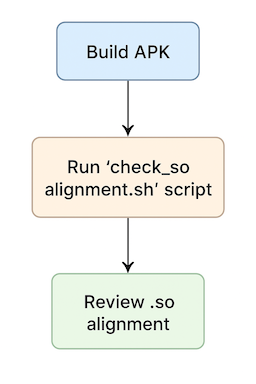
A simple flow diagram outlining our approach:
Step 1: Restrict Your Build to 64-Bit ABIs
Add the following to android/app/build.gradle:
android {
    defaultConfig {
        ndk {
            abiFilters "arm64-v8a", "x86_64"
        }
    }
}
This ensures only 64-bit .so libraries are built.
Step 2: Exclude Legacy 32-Bit .so Files
Also in build.gradle:
android {
    packagingOptions {
        // Exclude old 32-bit ABIs
        exclude 'lib/armeabi/*'
        exclude 'lib/armeabi-v7a/*'
        exclude 'lib/x86/*'
        exclude 'lib/mips/*'

        // Handle duplicate 64-bit libs
        pickFirst 'lib/arm64-v8a/libc++_shared.so'
        pickFirst 'lib/x86_64/libc++_shared.so'
        pickFirst 'lib/arm64-v8a/libjsc.so'
        pickFirst 'lib/x86_64/libjsc.so'
    }
}
This prevents misaligned prebuilt 32-bit libraries from being packaged into your APK.
Step 3: Clean and Rebuild React Native APK for 16KB Alignment
cd android
rm -rf app/.cxx app/build build
./gradlew clean
./gradlew assembleRelease
After rebuilding, unzip your APK and recheck .so alignment. You should see only:
lib/arm64-v8a/*.solib/x86_64/*.so
All with 16KB alignment (0x4000)✅
Step 4: Optional Automated Script to Check .so Alignment in React Native Apps
You can save this script in your project to automatically verify .so alignment after building your APK or AAB:
#!/bin/zsh
APK_PATH="app-release.apk"
OUT_DIR="./apk_contents"
GREADELF="/usr/local/opt/binutils/bin/greadelf"

rm -rf "$OUT_DIR"
unzip -q "$APK_PATH" -d "$OUT_DIR"

echo "🔎 Checking .so alignment..."
BAD=0
GOOD=0

find "$OUT_DIR/lib" -name "*.so" | while read sofile; do
  ALIGN=$($GREADELF -l "$sofile" | grep -E "LOAD" | awk '{print $NF}')
  if [[ "$ALIGN" == "0x1000" ]]; then
    echo "❌ $sofile (Align $ALIGN) → NOT 16KB ready"
    BAD=$((BAD+1))
  else
    echo "✅ $sofile (Align $ALIGN) → OK"
    GOOD=$((GOOD+1))
  fi
done

echo "-------------------------------------------"
echo "Summary: ✅ $GOOD OK | ❌ $BAD not 16KB ready"
How to Execute the Automated Alignment Script
- Save the script in your project root as check_so_alignment.sh.
- Make the script executable:
chmod +x check_so_alignment.sh
- Run the script after building your APK or AAB:
./check_so_alignment.sh
- The script will:
- Unzip your APK/AAB
- Scan all .so files inside lib/ folders
- Print each library’s alignment
- Give a summary of how many are 16KB aligned
✅ This ensures that your React Native APK or AAB is compliant with Google Play’s 16KB requirement before submission.
Trade-Offs: Dropping 32-Bit ABIs
By excluding armeabi-v7a and x86:
- Your app won’t run on 32-bit devices
- Most modern devices are 64-bit, so this is safe for most apps
- If you need 32-bit support, you must rebuild the libraries yourself with proper 16KB alignment
Conclusion
To make your React Native Android app 16KB page size compliant:
- Restrict builds to 64-bit ABIs
(arm64-v8a, x86_64) - Exclude legacy 32-bit libraries in
packagingOptions - Clean old builds and rebuild
- Verify
.soalignment
Following these steps ensures 16KB page size alignment and prevents Play Store rejections.
Comment
Despite implementing the method described above, the core .so libraries from React Native are still included in the final build. This issue will persist until it is officially addressed by the React Native development team.
Let's bring your app idea to life
I specialize in mobile and backend development.